
Important Update: InteleConnect Browser Global Display Issue
Important Update: InteleConnect Browser Global Display Issue
What is the Issue?
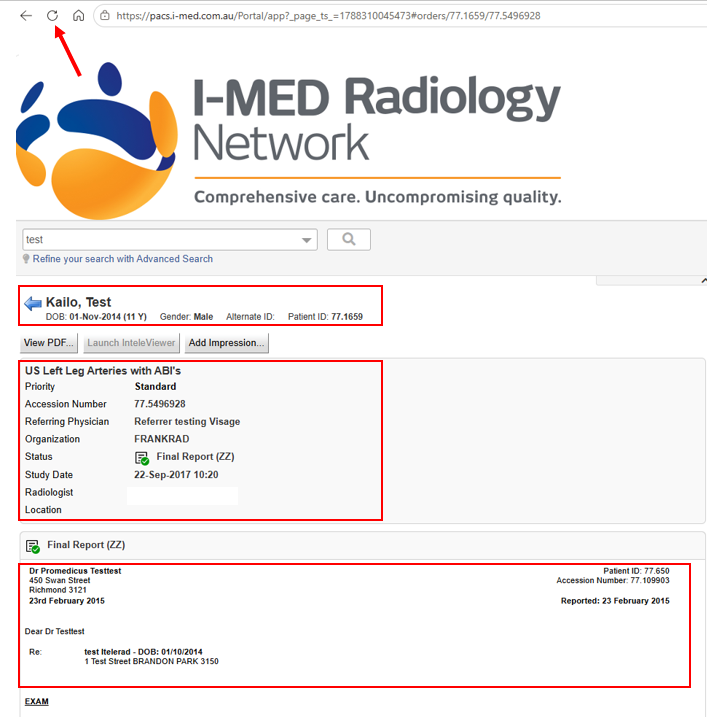
When viewing patient cases via InteleConnect on Edge or Chrome, you may encounter a bug where the clinical report shown does not match the currently selected patient. In some instances, the report from the previously viewed patient remains on the screen.
Current Status
Our technical teams are actively investigating this issue within InteleConnect, but it is currently unresolved.
Temporary Workaround
To ensure you can continue to access correct patient information, please use the following solution:
- Recommended: Simply refresh your web browser page. This is the fastest way to force the system to update and display the correct report.
Important Precaution
Until a permanent fix is implemented, we strongly advise all users to carefully verify that the displayed report explicitly matches the selected patient's details before reviewing any clinical data.
Please note: This display issue is isolated to InteleConnect portal and does not impact users accessing cases via the desktop InteleViewer software.
We are working on a fix
I-MED Radiology Network is working with InteleConnect to resolve this browser compatibility issue as quickly as possible. We will provide a further update once the problem has been resolved.
This issue is not affecting the patient portal.
Need Assistance?
If you require support accessing your images or reports, please contact our Referrer Success Team on 1300 147 852.